

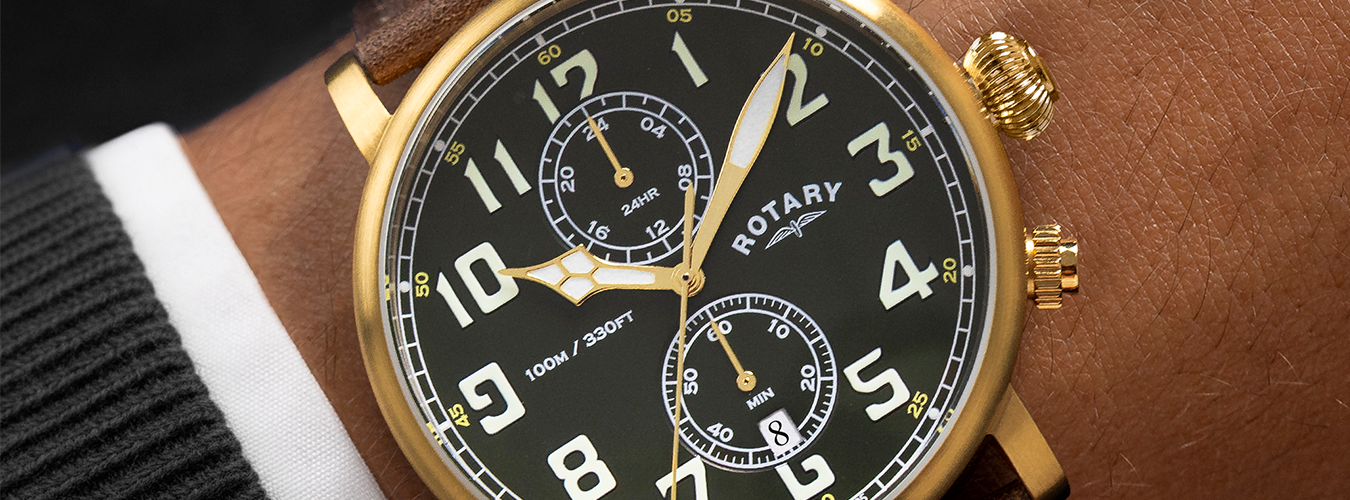
How to Set the Time and Use the Dual Time Function on Your Rotary Apex100 Pilot
The Apex100 Pilot is designed with practicality and reliability in mind, this movement allows you to track two independent time zones - perfect for travellers, pilots, or anyone managing connections across countries.
This guide will take you step-by-step through setting both the main time and the dual time sub-dial, as well as how to make fine adjustments using the pushers and crown.
Understanding the Controls
Before you begin, familiarise yourself with the watch’s functions:
-
Crown (at 3 o’clock): used to set the main time and, when pulled out, to enable minute adjustment for the dual time sub-dial.
-
Upper Pusher (A) (at 2 o’clock): moves the dual time display forward by one hour with each press.
-
Lower Pusher (B) (at 4 o’clock): moves the dual time display backward by one hour, and when the crown is pulled out, adjusts the dual time minutes.
Always ensure the crown is fully pushed in when not setting the time to preserve water resistance.
Step 1: Setting the Main Time
-
Pull the crown out to Position 2 (two clicks).
-
The second hand will stop.
-
Rotate the crown clockwise or anti-clockwise until the main hour and minute hands show the correct local time.
-
Push the crown fully back in to start the watch.
-
The second hand will begin moving again.
Tip: Set the main hands to your current time zone before adjusting the dual time display.
Step 2: Setting the Dual Time (Secondary Time Zone)
The sub-dial on your Apex100 Pilot lets you display a second time zone - ideal for tracking home time while travelling, or keeping in sync with international colleagues.
-
Ensure the crown is pushed fully in (Position 0).
-
Use the Upper Pusher (A) to move the Dual Time forward by one hour per press.
-
Use the Lower Pusher (B) to move the Dual Time backward by one hour per press.
-
Hold a pusher for continuous movement if you need to make a large adjustment.
Example: If the main dial shows London time (GMT) and you want to set New York time (GMT–5), press the lower pusher five times to move the Dual Time display five hours behind.
Step 3: Adjusting the Dual Time Minutes
If the Dual Time sub-dial is not perfectly synchronised to the minute, you can fine-tune it easily.
-
Pull the crown out to Position 2.
-
While in this position, press the Lower Pusher (B) to move the Dual Time minute hand forward in one-minute increments.
-
Hold for rapid movement.
-
Once aligned, push the crown fully back in.
Step 4: Adjusting the Date (if applicable)
If your Apex100 Pilot includes a date window:
-
Pull the crown out to Position 1 (first click).
-
Rotate the crown clockwise until the correct date appears.
-
Avoid adjusting the date between 8 PM and 4 AM, as this is when the date mechanism is active.
-
Push the crown fully in after setting.
Step 5: Resetting the Dual Time Display
If the Dual Time sub-dial becomes misaligned after a battery replacement or accidental adjustment, you can reset it:
-
Pull the crown out to Position 2.
-
Press and hold both pushers (A and B) at the same time for a few seconds.
-
The Dual Time hands will return to their 12:00 position.
-
Release both pushers and set your Dual Time again using the standard method.
Step 6: Battery and Maintenance
Your Apex100 Pilot is powered by a long-life quartz battery, typically lasting between 2–3 years. To maintain its performance:
-
Always have the battery replaced by an authorised Rotary service centre.
-
Keep the crown pushed in to maintain water resistance.
-
Avoid operating the pushers underwater or exposing the watch to strong magnetic fields and extreme temperatures.
Crown and Pusher Overview
|
Control |
Function |
Operation |
|
Crown (Position 0) |
Normal operation |
Watch runs; Dual Time adjusted via pushers |
|
Crown (Position 1) |
Date adjustment |
Rotate crown clockwise |
|
Crown (Position 2) |
Main time adjustment |
Rotate crown |
|
Upper Pusher (A) |
Dual Time +1 hour |
Press to move forward |
|
Lower Pusher (B) |
Dual Time –1 hour |
Press to move backward |
|
Lower Pusher (B) + Crown at Position 2 |
Dual Time +1 minute |
Press to advance minute hand |
Final Check
Once both the main and dual time displays are set:
-
Confirm the main time matches your local time zone.
-
Verify the dual time sub-dial correctly reflects your chosen secondary zone.
-
Ensure the crown is pushed fully in and secure.
Your Rotary Apex100 Pilot is now correctly set and ready for daily wear - a rugged companion built for life across time zones.

Written by Fraser James